How Salesforce Built-In Authenticators Reduce Account Risk
Ever feel like your phone has become a permanent part of your hand just to log into Salesforce? You’re not alone.
Passwords alone are no longer enough. Attackers know this. Phishing kits, credential leaks, and automated login attacks have made simple username-and-password logins one of the weakest points in enterprise security.
That’s why Salesforce requires multi-factor authentication (MFA). But not all MFA forms are the same. The most common are mobile-based forms, but they can create friction.
This is where Salesforce’s Built-In Authenticators come in.
The Problem With Phone-Based MFA
Phone-based MFA forms are common and secure, but they aren’t always the best choice. From a user experience perspective, they introduce several points of failure:
- They can feel intrusive when used on a personal phone.
- They can be inconvenient, requiring users to reach for a phone every time they log in.
- They may be restricted or discouraged, especially in industries where phones aren’t allowed.
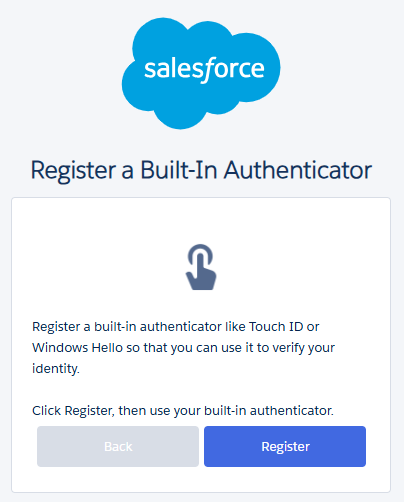
In high-security environments, where phones may not even be allowed on the floor, it’s most common to use physical security keys (e.g., YubiKey) or external authenticator apps (Google Authenticator). While this works well, in some scenarios, Salesforce’s Built-In Authenticators may put the security team at ease, while providing a more streamlined experience for users.
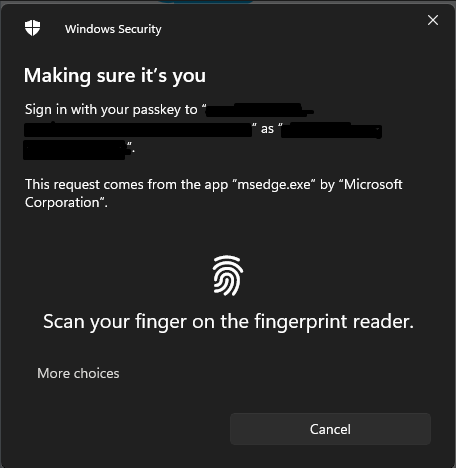
Critically, biometric data never leaves the device. Salesforce doesn’t receive fingerprints or face scans. The device simply proves, cryptographically, that the correct user is present.
From a cybersecurity standpoint, this dramatically reduces the attack surface.
Why This Matters
Built-In Authenticators provide a much cleaner login experience for some users, while also aligning closely with modern zero-trust security models, where identity verification is continuous, contextual, and hardware-backed, while providing strong protection against some of the most common attack methods:
- Phishing resistance: An attacker can’t reuse a stolen password without physical access to the registered device.
- Prompt fatigue protection: There’s no push notification to blindly approve.
- Credential replay prevention: Authentication is tied to a specific device and cryptographic key.
A Better Balance Between Security and Usability
One of the hardest problems in cybersecurity is balancing protection with productivity. Controls that slow users down tend to be bypassed, ignored, or resented.
Built-In Authenticators deliver security and reduce friction. When logging in feels natural, “like unlocking your computer”, users are less likely to show resistance.
Final Thoughts
Too often, organizations enable controls without considering how they intersect with user behavior, device strategy, and overall identity architecture.
At asUgo, we help Salesforce customers design authentication strategies that are secure, practical, and grounded in real-world usage, from selecting the right MFA methods to enabling phishing-resistant options like Built-In Authenticators while ensuring proper recovery, governance, and compliance. When deployed as part of a layered, zero-trust approach, Salesforce Built-In Authenticators can significantly reduce account-takeover risk without slowing users down – striking the balance that modern cybersecurity should always aim for.
Authors: Vitor Batista, Senior Back-end Developer, asUgo